

How Data Recovery Software Saved My Photography Career Three Times
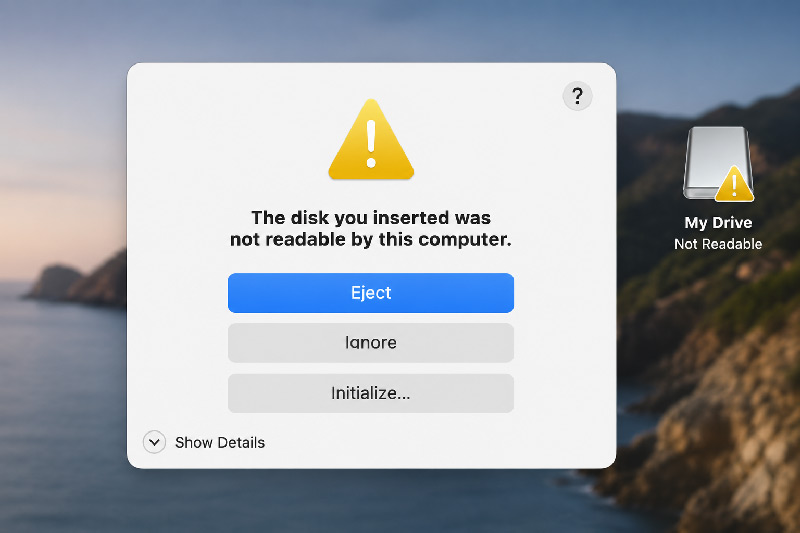
Table of Contents
Three Real-Life Data Disasters Every Photographer Can Learn From
If you’re a professional photographer or videographer, there are few things more frightening than returning from an important assignment only to discover that your files have disappeared.
Over the years, I’ve photographed everything from luxury yachts and commercial projects to tourism campaigns, weddings and concerts. Like most photographers, I’ve invested thousands of pounds in cameras, lenses, computers and storage systems.
But despite all that investment, there have been three occasions where my career very nearly took a very different direction; and how data recovery software saved my photography career three times.
A corrupted SD card.
A failed RAID drive.
A damaged hard drive containing irreplaceable video footage.
Each time, I genuinely believed months—or even years—of work could be gone forever.
Fortunately, those stories all had positive endings.
They also completely changed the way I think about data recovery for photographers.
When Everything Depends on One Memory Card

One of the most important assignments of my career took place at the ADDA (Auditorio de la Diputación de Alicante).
I had been commissioned to photograph portraits of the Artistic Director. It wasn’t just another assignment—it was an opportunity that could potentially lead to a long-term relationship with one of Spain’s leading orchestras.
Naturally, I wanted everything to be perfect.
The photoshoot went extremely well.
The lighting was right.
The expressions were natural.
I left feeling confident that I’d captured exactly what was needed.
Then I returned to my office.
I inserted the SD card into my computer…
…and immediately realised something was terribly wrong.
The memory card had become corrupted.
Years of photography had taught me to remain calm, but inside I was already imagining the conversation I’d have to have with my client.
“I’m sorry… I’ve lost your photographs.”
For a photographer, there are few sentences worse than that.
Nothing Worked… Until It Did
Like many photographers, my first instinct was to search online.
I tried free utilities.
Recovery tips.
Forum recommendations.
Nothing recovered the photographs.
Eventually, after reading numerous reviews, I decided to purchase Disk Drill.
Within approximately an hour, the images had been successfully recovered.
It was one of the biggest moments of relief in my professional career.
The portraits were delivered successfully…
…and that assignment ultimately led to me becoming the official photographer for the ADDA Simfònica Orchestra.
It’s impossible to know how differently my career might have unfolded had those photographs been permanently lost.
Lesson One: Never Assume Memory Cards Are Safe
Modern SD cards are remarkably reliable.
But they are not indestructible.
Corruption can occur through:
- Interrupted transfers
- Removing cards too early
- File system damage
- Power loss
- Physical failure
- Card wear over time
Most photographers never expect it to happen.
Neither did I.
Until it did.
The RAID Failure That Nearly Cost Years of Retouching Work
Several years later, another disaster struck.
This time it wasn’t photography.
It was my retouching business.
Like many professionals, I stored large quantities of client work on a RAID drive.
There’s a common misconception that RAID automatically protects your files.
It doesn’t.
RAID improves availability.
It is not a backup.
When my RAID system failed, I suddenly found myself facing the possibility of losing years of professional work.
Client files.
Ongoing projects.
Archives.
Everything.
Fortunately, once again, I was able to recover the data.
That experience completely changed my backup strategy.
If you’d like to read the full story from the perspective of my retouching business, you can also read:
Why Every Professional Photo Retoucher Needs a Data Recovery Plan
(Internal link to your retouching website article.)
Lesson Two: RAID Is Not a Backup
This is probably the biggest misunderstanding in professional photography.
A RAID system can protect against certain drive failures.
It does not protect against:
- File corruption
- Accidental deletion
- Theft
- Fire
- Flood
- Malware
- Multiple drive failures
- Controller failure
If your only copy exists on a RAID, you don’t actually have a backup.
The Assignment That Nearly Ended Before the Edit Began
The third incident involved video production.
After returning from an assignment, I began transferring footage to my editing workstation.
During the transfer, the hard drive was accidentally damaged.
Unlike photographs, video assignments are often impossible to recreate.
Locations change.
People leave.
Weather changes.
Events cannot simply be repeated.
For a while, I genuinely believed the project had been lost.
Fortunately, the recovery process successfully retrieved almost every clip.
Only a single video file couldn’t be recovered.
With careful editing, alternative footage and creative storytelling, I was still able to produce a final film that both I and my client were delighted with.
Without the recovered files, that simply wouldn’t have been possible.
Lesson Three: Recovery Software Is Insurance You Hope Never to Use
One of the biggest mistakes photographers make is waiting until disaster strikes before thinking about recovery software.
When panic sets in, people often:
- Continue using the damaged drive
- Format memory cards
- Install random recovery programs
- Accidentally overwrite recoverable data
Every one of those actions reduces the chance of successful recovery.
Having recovery software available before you need it can make all the difference.
My Backup Strategy Today
Those three experiences completely changed how I manage client work.
Today, every assignment follows a much stricter workflow.
During the Shoot
- High-quality memory cards
- Cards handled carefully
- Files never deleted until multiple backups exist
Immediately After the Shoot
- Copy to working SSD
- Copy to external backup
- Verify file integrity
Long-Term Storage
- Multiple physical drives
- Separate backup locations
- Cloud backup where appropriate
- Archive verification
No system is perfect.
But multiple backups dramatically reduce risk.
How Different Recovery Programs Compare
Having used recovery software during genuine emergencies, I’ve also looked at several popular recovery applications. Each has its own strengths depending on the situation.
| Software | Best For | Advantages | Considerations |
|---|---|---|---|
| Disk Drill | Photographers and general users | Straightforward interface, supports many file types including RAW images, good balance of ease of use and recovery features | Paid licence required for full recovery beyond trial limits |
| R-Studio | Advanced users and IT professionals | Very powerful recovery capabilities and deep scanning options | Steeper learning curve for non-technical users |
| EaseUS Data Recovery Wizard | Home and business users | User-friendly interface and broad file support | Licensing options may become expensive depending on the edition you choose |
| Recuva | Simple accidental deletions | Free version available and easy to use | Best suited to straightforward recoveries rather than severe corruption or complex failures |
No software can guarantee recovery in every situation. Success depends on factors such as the type of failure, whether new data has overwritten the original files, and how quickly recovery begins.
The Most Important Thing Every Photographer Should Know
If you suspect data loss:
✔ Stop using the card or drive immediately.
✔ Don’t format it.
✔ Don’t continue shooting on the same memory card.
✔ Attempt recovery before writing any new data.
Those simple decisions can dramatically improve the chances of recovering your work.
How Data Recovery Software Saved My Photography Career Three Times – Final Thoughts
Looking back, I consider myself incredibly fortunate.
Three separate incidents over several years could easily have ended very differently.
One almost cost me an important photography opportunity.
Another threatened years of professional retouching work.
The third nearly ruined a major video assignment.
Each experience taught me the same lesson:
Photography isn’t just about creating great images.
It’s about protecting them.
Today, backup strategies are just as important to me as camera settings, lenses or lighting.
Because the best photograph in the world has no value if you can’t recover it.
Frequently Asked Questions
Can corrupted SD cards really be recovered?
Often, yes. If the card has not been overwritten and the damage is logical rather than severe physical damage, recovery software may be able to retrieve some or all of the files. The chances generally improve if you stop using the card immediately.
Is RAID a backup?
No. RAID can improve resilience against certain hardware failures, but it does not replace a proper backup strategy with separate copies of your data.
What should photographers do immediately after data loss?
Stop using the affected drive or memory card. Avoid formatting it or copying new files onto it, as this can reduce the likelihood of successful recovery.
Can deleted RAW photographs be recovered?
In many cases, yes. Provided the storage media has not been overwritten, specialist recovery software can often retrieve deleted RAW files.
Which data recovery software is best?
There is no single solution for every situation. Disk Drill, R-Studio, EaseUS Data Recovery Wizard and Recuva each have different strengths depending on the complexity of the recovery and the user’s technical experience.
Protect Your Images Before It’s Too Late
Whether you’re photographing weddings, commercial campaigns, concerts or creating promotional videos, losing client files can have serious consequences.
Investing in a sensible backup strategy and understanding your recovery options before disaster strikes could be one of the best decisions you make for your photography business.
After three close calls, it’s a lesson I’ll never forget.